
Free llms.txt Generator
Enter your website and get a ready-to-publish llms.txt file built from your sitemap and page titles, free and with no sign-up.
Generate your llms.txt
Edit it here if you like, then save it as llms.txt at the root of your site, so it loads at yoursite.com/llms.txt.
Try an example:
How to Use the llms.txt Generator
- Step 1: Enter your website address in the box above.
- Step 2: Select “Generate llms.txt” to read your sitemap and page titles.
- Step 3: Edit the draft, then save it as llms.txt at the root of your site.
What the Result Looks Like
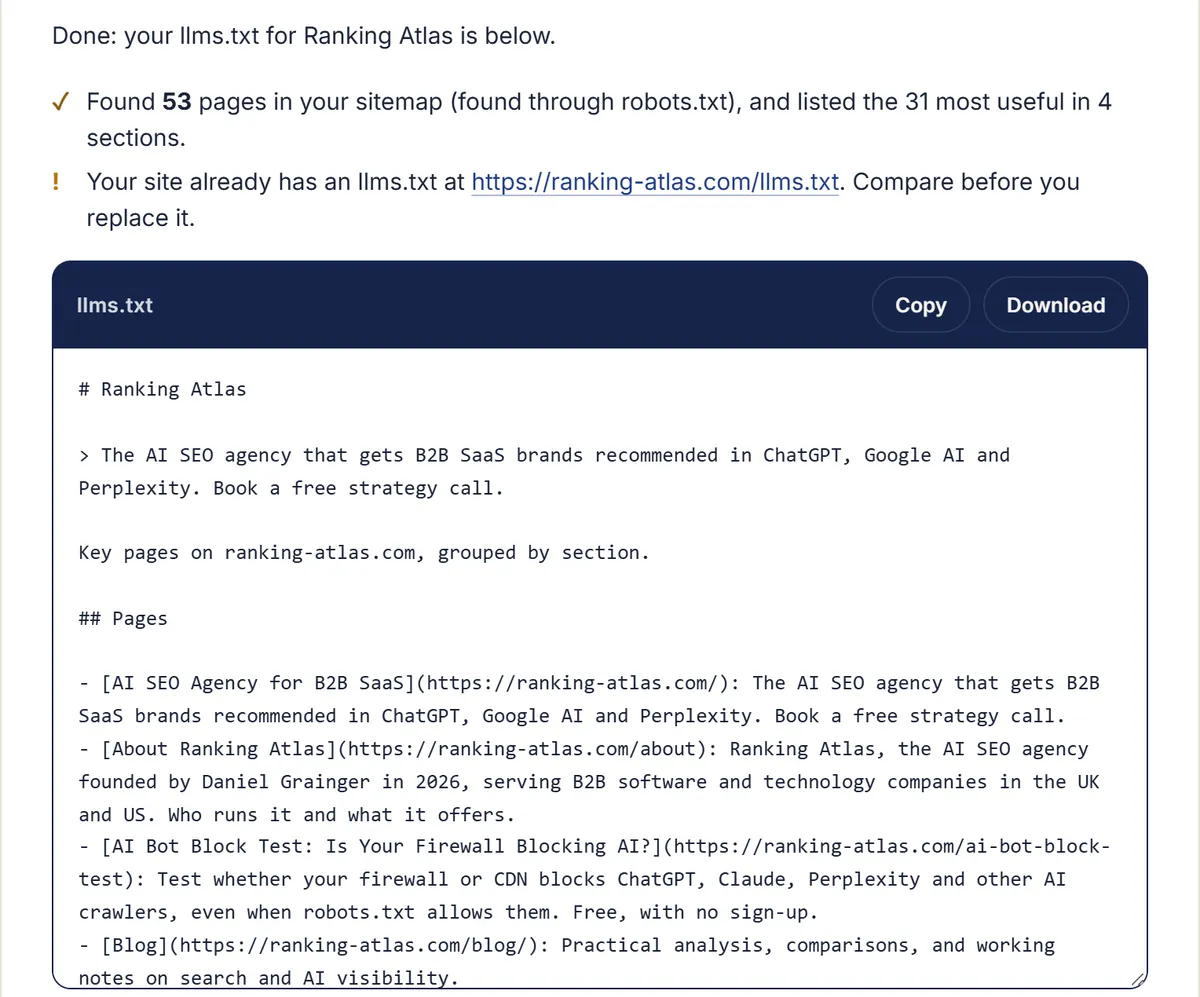
The generator run on ranking-atlas.com on 16 October 2026: 53 pages found in the sitemap, the 31 most useful listed in four sections, and a draft file ready to edit, copy or download.
What Is an llms.txt File?
An llms.txt file is a plain-text Markdown file at the root of a website, at /llms.txt, that lists the site’s most useful pages with a one-line summary of each. Jeremy Howard proposed it in September 2024 as a map that large language models can read more easily than full web pages.
The format is published at llmstxt.org. It is a proposal, not a standard any search engine has adopted, which matters for what you should expect from it (more on that below).
What Does This Generator Do?
It reads your robots.txt to find your XML sitemap, collects your pages, then fetches the title and meta description of up to 40 of them. It groups them by section, moves legal and archive pages to an Optional section, and writes the file in the llmstxt.org format, ready to copy or download.
-
Finds your pages
From the sitemaps listed in your robots.txt, or /sitemap.xml if none are listed. Without a sitemap, it uses the links on your homepage.
-
Chooses the useful ones
One entry per page, translated copies (such as /fr/ or /en-gb/) skipped, and every section represented, shallow pages first.
-
Reads titles and descriptions
Each page’s own title and meta description become its link text and summary, with your brand name trimmed from the end.
-
Writes the file
Your site name as the H1, your homepage description as the summary, then one H2 section per part of your site.
How Do You Add llms.txt to Your Site?
Check the file first: fix any titles that came from URLs and remove pages you would not want summarised. Then save it as llms.txt in your site’s root folder, or add it through your CMS or SEO plugin if it supports llms.txt, so that it opens at yoursite.com/llms.txt as plain text.
- Review the file in the box above, and edit any line that reads badly.
- Upload it to the root of your site, next to robots.txt.
- Open yoursite.com/llms.txt in a browser to check that it shows as plain text, not as a web page.
- Check that AI crawlers can reach the site at all with our free robots.txt checker: llms.txt does nothing for a crawler your robots.txt blocks.
- Run the generator again when you add or retire important pages.
Do AI Engines Actually Use llms.txt?
Not in any confirmed way yet. Google’s John Mueller wrote in June 2025 that “no AI system currently uses llms.txt”, and no major AI company has said publicly that its answers draw on the file. It costs little to publish, but it will not do the work of pages that answer your buyers’ questions.
Source: Search Engine Roundtable, 18 June 2025. What does move AI visibility is content an engine can quote, a consistent description of your company across the web, and coverage in the sources AI already cites. Our guide on how to get cited by ChatGPT walks through that work.
llms.txt Example: What Should the File Include?
Under the llmstxt.org format, only the H1 with your site or project name is required. After it come a short summary in a blockquote, optional notes, then H2 sections that list links as “- [Name](URL): description”, with a section called Optional for pages an AI can skip.
# Example Software

> Example Software makes invoicing tools for small accounting firms in the UK.

## Product

- [Features](https://example.com/features): What the invoicing tool does.
- [Pricing](https://example.com/pricing): Plans and prices.

## Optional

- [Privacy policy](https://example.com/privacy)
Frequently Asked Questions
Is llms.txt the Same as robots.txt?
No. robots.txt tells crawlers which pages they may visit. llms.txt does not allow or block anything: it is a short guide to your most useful pages. Keep both, and never rely on llms.txt to stop a crawler.
Does llms.txt Need to List Every Page?
No. List the pages that explain what you do, who it is for, your main products or services and your best guides. This generator lists up to 40 pages and puts legal and archive pages under an Optional section.
Is the Generator Free?
Yes, with no sign-up. It reads only your public robots.txt, sitemap and pages, the same files any visitor or search engine can see, and we don’t save the address you enter.
Why Did Some Titles Come From URLs?
The generator stops after about 10 seconds. On large or slow sites it cannot read every page title in that time, so it names the remaining pages from their URLs and tells you how many. Edit those lines before you publish the file.
See How AI Search Sees Your Site
Find out what AI engines say about your brand, who they recommend instead, and what we'd change first.
Rather talk it through? Get in touch.
More Free AI SEO Tools
robots.txt Checker
See which AI search, answer and training crawlers your robots.txt lets in, with the exact rule behind each result and the lines to fix it.
Firewall and CDNAI Bot Block Test
Find out whether your firewall or CDN turns ChatGPT, Claude, Perplexity and other AI crawlers away, even when robots.txt allows them.