
Free robots.txt Checker for AI Crawlers
Enter your website and see which AI search, answer and training crawlers your robots.txt lets in, with the exact rule behind each result.
Check your robots.txt
AI search and answer crawlers
These decide whether AI engines and search can fetch, show and cite your pages.
AI training crawlers
These only decide whether your content is used to train AI models. Blocking them is a business choice, not an error.
Add these as their own group, above any “User-agent: *” group. A group that names a crawler replaces the * rules for that crawler, so check the result here again afterwards.
Try an example:
How to Use the robots.txt Checker
- Step 1: Enter your website address in the box above.
- Step 2: Select “Check AI crawlers” to read your live robots.txt.
- Step 3: Review each crawler and the rule behind it, then fix any block you didn’t intend.
What the Result Looks Like
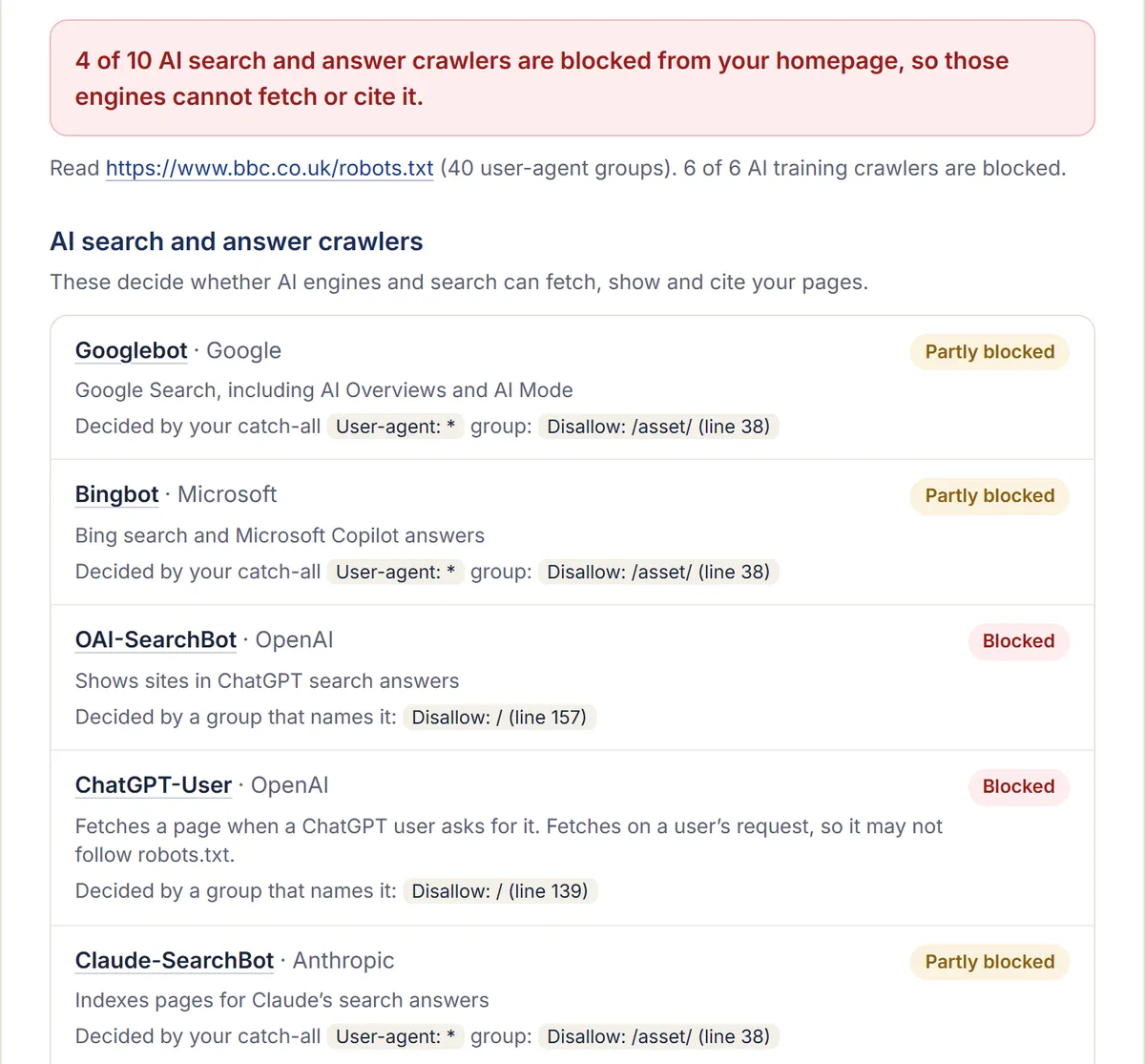
The checker run on bbc.co.uk on 16 October 2026: four AI search and answer crawlers blocked from the homepage, and each result shows the robots.txt line that decides it.
What Does This robots.txt Checker Test?
It reads your robots.txt and works out, for 16 crawlers from OpenAI, Anthropic, Perplexity, Google, Microsoft, Apple, Meta and Common Crawl, whether each may reach your homepage. It follows the robots.txt standard (RFC 9309), shows the rule that decided each result, and flags typos and catch-all rules that block crawlers by accident.
Results are split in two, because the crawlers do two different jobs. One group decides whether AI engines can find, show and cite your pages. The other only decides whether your content is used to train AI models.
Which AI Crawlers Decide Whether You Appear in AI Answers?
The search and answer crawlers do: OAI-SearchBot for ChatGPT search, Claude-SearchBot for Claude, PerplexityBot for Perplexity, and Googlebot and Bingbot for Google and Bing, including their AI features. Block one of these and that engine cannot fetch your pages to cite them. Training crawlers such as GPTBot and ClaudeBot do not decide this.
| Crawler | Company | Job | What it does |
|---|---|---|---|
| OAI-SearchBot | OpenAI | Search and answers | Shows sites in ChatGPT search answers |
| GPTBot | OpenAI | Training | Collects content to train OpenAI’s models |
| Claude-SearchBot | Anthropic | Search and answers | Indexes pages for Claude’s search answers |
| ClaudeBot | Anthropic | Training | Collects content to train Anthropic’s models |
| PerplexityBot | Perplexity | Search and answers | Shows and links sites in Perplexity answers |
| Googlebot | Search and answers | Google Search, including its AI features | |
| Google-Extended | Training | Gemini training and grounding; does not affect Google Search | |
| Applebot-Extended | Apple | Training | Training Apple’s foundation models |
| Meta-ExternalAgent | Meta | Training | Training Meta’s AI models and indexing |
Each crawler links to its company’s own documentation, checked on 16 October 2026. Companies add and rename crawlers, so check those pages before you make a permanent rule.
Should You Block AI Training Crawlers?
That is a business decision, not a technical fix. Blocking a training crawler keeps your content out of future model training without, by the companies’ own accounts, removing you from their search answers. Allowing it lets future models learn about your company. Which matters more depends on whether you would rather keep your content out of training or have AI models know your brand.
Two details are worth knowing. OpenAI states that sites opted out of OAI-SearchBot will not be shown in ChatGPT search answers, while GPTBot covers training only (OpenAI). Google states that Google-Extended does not affect inclusion in Google Search, though it does cover grounding in Gemini as well as training (Google).
How Do You Unblock an AI Crawler?
Add a group to your robots.txt that names the crawler and allows it, or remove the rule that blocks it. A group that names a crawler replaces your catch-all “User-agent: *” rules for that crawler, so copy across any paths you still want closed to it, then run the checker again.
- Open yoursite.com/robots.txt and find the line the checker reports for the blocked crawler.
- Edit that rule, or add the suggested lines from the checker as their own group above “User-agent: *”.
- Publish the file and run the checker again to confirm the change.
- If a crawler is still blocked in practice, check your CDN or firewall: some block AI bots by default, whatever robots.txt says. Our AI bot block test shows whether yours does.
Once crawlers can reach you, an llms.txt file can point them to your key pages. Our free llms.txt generator builds one from your sitemap.
Frequently Asked Questions
Does robots.txt Stop Every AI Bot?
No. It is a request that well-behaved crawlers follow, not a lock. Bots that fetch a page because a user asked for it, such as ChatGPT-User and Perplexity-User, may not follow it, and some crawlers ignore it entirely. To keep something private, put it behind a login.
Will Blocking GPTBot Remove My Site From ChatGPT?
Not from ChatGPT search, according to OpenAI. GPTBot controls whether your content is used to train its models; OAI-SearchBot controls whether your site can appear in ChatGPT search answers. You can block one and allow the other.
Does This Check My Whole Site?
It checks whether each crawler can reach your homepage, and marks a crawler as partly blocked when your robots.txt closes any other paths to it. It reads robots.txt only: a firewall or CDN bot setting can still block a crawler that robots.txt allows.
Is the Checker Free?
Yes, with no sign-up. It reads only your public robots.txt, the same file any crawler reads, and we don’t save the address you enter.
See How AI Search Sees Your Site
Find out what AI engines say about your brand, who they recommend instead, and what we'd change first.
Rather talk it through? Get in touch.
More Free AI SEO Tools
AI Bot Block Test
Find out whether your firewall or CDN turns ChatGPT, Claude, Perplexity and other AI crawlers away, even when robots.txt allows them.
AI site mapllms.txt Generator
Build an llms.txt file for your website from its sitemap and page titles, ready to edit, copy or download.