
Is Your Firewall Blocking AI Bots? Free Test
Enter your website and see whether ChatGPT, Claude, Perplexity and other AI crawlers get the same page as a browser, or get blocked by your firewall or CDN.
Test your site for AI bot blocks
AI search and answer crawlers
If these are blocked, the engines behind them cannot fetch your page to show or cite it.
AI training crawlers
These only collect content for model training. Blocking them can be deliberate.
Requests come from our server, not the crawlers’ own networks. A firewall that also checks where a request comes from may block this test but allow the real crawler, so treat a block as a strong lead and confirm it in your firewall or CDN settings.
Try an example:
How to Use the AI Bot Block Test
- Step 1: Enter your website address, or a full page address to test one page.
- Step 2: Select “Test AI bots” to request the page as a browser and as each crawler.
- Step 3: Compare each crawler with the browser, then check any block in your firewall or CDN settings.
What the Result Looks Like
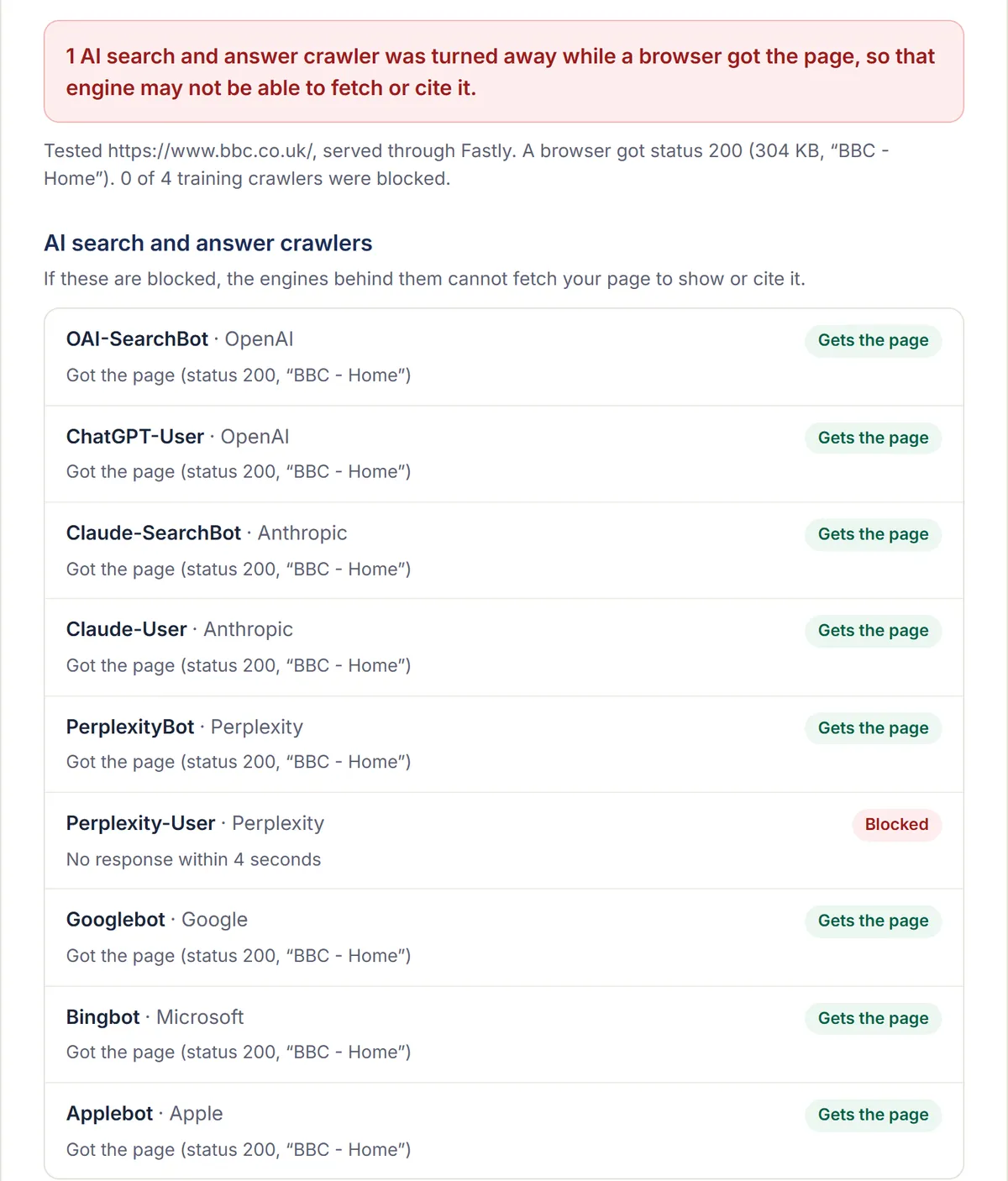
The test run on bbc.co.uk on 16 October 2026: the site is served through Fastly, a browser got the page, and one AI crawler, Perplexity-User, got no response within four seconds.
What Does the AI Bot Block Test Check?
It requests one page from your site as an ordinary browser, then again as each of 13 AI and search crawlers, using the user-agent each company publishes. If the browser gets your page but a crawler gets an error, a challenge page or a near-empty page, something in front of your site is turning that crawler away.
That something is usually a firewall or CDN bot setting, not your robots.txt. Run our free robots.txt checker too: between them, the two tests cover both ways a site can shut AI crawlers out.
Why Can AI Bots Be Blocked When robots.txt Allows Them?
Because robots.txt is a request crawlers choose to follow, while a firewall decides who gets through at all. CDNs such as Cloudflare offer settings that block AI crawlers before robots.txt is ever read, and they can be switched on by default or by someone else on your team.
Cloudflare’s AI bot policies, for example, sort crawlers into Search, Agent and Training groups, each set to block, block on pages with ads, or allow. According to Cloudflare’s documentation, from 15 September 2026 new domains block Training and Agent crawlers on pages that show ads, while Search crawlers stay allowed. Agent crawlers include the ones that fetch a page when someone asks ChatGPT or Perplexity about it.
How Do You Unblock AI Crawlers in Your Firewall?
Find the setting that blocks them, allow the crawlers you want by name, and test again. The result above names your CDN when it can tell; that is the first place to look.
- Open your CDN or firewall dashboard and find its bot settings. In Cloudflare, that is Security Settings, under AI bot policies.
- Allow the AI search and answer crawlers you want: at least OAI-SearchBot, Claude-SearchBot and PerplexityBot, plus the agent crawlers if you want pages fetched when users ask about them.
- Decide separately about training crawlers such as GPTBot and ClaudeBot. Blocking them is a business choice, not an error.
- Run this test again, and check your robots.txt with the robots.txt checker.
How Reliable Is This Test?
It is a strong lead, not proof. The requests come from our server, so a firewall that checks only the crawler’s name responds as it would to the real crawler, but one that also checks where the request comes from may block this test and still allow the real crawler.
That is why Googlebot and Bingbot are marked “Check” rather than “Blocked” when they are refused: those names are widely faked, and many firewalls verify them. For an AI crawler, a block here while the browser gets through points to a rule that names AI crawlers.
Frequently Asked Questions
Why Does My Site Block Even the Browser Request?
Some firewalls challenge any request that comes from a cloud server, whatever it calls itself, because most automated traffic does. When that happens the test cannot separate AI crawlers from everything else, so check your firewall or CDN bot settings directly.
Will Allowing AI Crawlers Let Scrapers In?
Not if you allow them by name and let your firewall verify them. The large AI companies document their crawlers, and many firewalls and CDNs, Cloudflare among them, can check that a request really comes from the company it names before letting it through.
Why Are Googlebot and Bingbot Marked “Check”?
Firewalls often block anyone posing as Googlebot or Bingbot from outside Google’s or Microsoft’s networks, because those names are widely faked. A block in this test is therefore not proof the real crawler is blocked. URL Inspection in Google Search Console or Bing Webmaster Tools shows what the real crawler gets.
Is the Test Free?
Yes, with no sign-up. It requests one public page, as a browser and as each crawler, and we don’t save the address you enter.
See How AI Search Sees Your Site
Find out what AI engines say about your brand, who they recommend instead, and what we'd change first.
Rather talk it through? Get in touch.
More Free AI SEO Tools
robots.txt Checker
See which AI search, answer and training crawlers your robots.txt lets in, with the exact rule behind each result and the lines to fix it.
AI site mapllms.txt Generator
Build an llms.txt file for your website from its sitemap and page titles, ready to edit, copy or download.